
Screenshots


App details
- Version
- 4.0
- Size
- 116.51 MB
- Updated
- January 15, 2022
- Requires
- Windows 7
- Language
- English
- License
- Trial version
- Developer
- xilisoft
- Category
- Windows OS
SoftPas in:
This product is also available in the following languages:
About Xilisoft iPhone Software Suite
Download Xilisoft iPhone Software Suite – All‑in‑One iPhone Management Tool
Why Xilisoft iPhone Software Suite Is the Ultimate iPhone Companion
Managing an iPhone can feel like juggling several separate utilities—one for video conversion, another for ringtone creation, yet another for file transfer. Xilisoft iPhone Software Suite eliminates that friction by bundling four powerful tools into a single, sleek application. Whether you need to convert DVD movies into iPhone‑ready MP4 files, rip audio tracks into MP3, M4A, or WAV, craft custom ringtones from your favorite songs or videos, or simply sync and back up data between your iPhone and computer, this suite covers every base. The interface is intentionally clean, offering drag‑and‑drop conversion, real‑time preview, and background processing so you can keep the suite running while you browse the web or work on other projects. Because all four utilities share a common engine, you benefit from consistent performance, regular updates, and a single licensing model instead of juggling multiple trial versions. For casual users who only need one feature, the suite still feels lightweight; power users can take advantage of batch processing and advanced settings without ever leaving the main window. In short, Xilisoft iPhone Software Suite delivers a secure, fast, and user‑friendly experience that consolidates every essential iPhone management task into one downloadable package.
Key Features That Set Xilisoft iPhone Software Suite Apart
- DVD to iPhone Converter – Seamlessly rip any DVD title and output directly to iPhone‑compatible MP4, preserving subtitles and aspect ratio.
- iPhone Video Converter – Supports over 150 video formats (MKV, AVI, MOV, etc.) and optimizes them for iOS devices with adjustable bitrate, resolution, and frame rate.
- Audio Extraction & Conversion – Turn video soundtracks or CD rips into MP3, M4A, or WAV files with customizable metadata tags.
- iPhone Ringtone Maker – Trim any song or video clip to the perfect 30‑second ringtone, add fade‑in/out effects, and export directly to your iPhone.
- iPhone Transfer & Backup – Transfer photos, contacts, messages, apps, and system files between iPhone and PC/Mac; create encrypted backups with one click.
- Batch Processing – Queue multiple files for conversion or transfer, saving time for large media libraries.
- Real‑time Preview – Preview video and audio output before committing, reducing trial‑and‑error.
- Background Mode – Run conversions or transfers while you continue to work on other applications.
- One‑Click Updates – Automatic updates ensure compatibility with the latest iOS releases and codec improvements.
Step‑by‑Step Installation and How to Get the Most Out of the Suite
Downloading and Installing
1. Visit the official Xilisoft website and click the “Download for Windows” or “Download for macOS” button, depending on your computer.
2. Once the installer (Xilisoft_iPhone_Suite_Setup.exe or .dmg) finishes downloading, run it and follow the on‑screen wizard. The installer checks for required components such as Microsoft Visual C++ Redistributable (Windows) or Apple’s QuickTime framework (macOS) and installs them automatically if missing.
3. Choose the default installation path or specify a custom folder, then click “Install.” The process typically completes in under two minutes on a modern PC or Mac.
4. After installation, launch the application from the desktop shortcut or the Applications folder. The first launch may prompt you to accept the end‑user license agreement and configure a default output folder for converted files.
Using the Four Core Tools
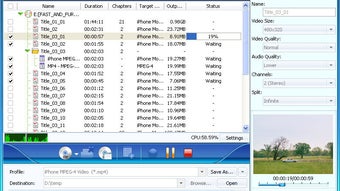
DVD to iPhone Converter: Insert the DVD, click “Add DVD,” select the title you want, and choose “iPhone MP4” from the preset list. Adjust resolution (e.g., 720p for older iPhones, 1080p for newer models) and hit “Convert.” The software will automatically detect the DVD’s region code and apply the necessary decryption if required.
iPhone Video Converter: Drag any video file into the window, pick an iPhone device profile (iPhone 14, iPhone SE, etc.), and customize audio bitrate if needed. Press “Start.” The built‑in preview lets you scrub through the video to confirm quality before exporting.
Ringtone Maker: Click “Create Ringtone,” import a song or video, set the start and end points using the waveform editor, and apply fade effects. Click “Export” and the program will automatically sync the ringtone to your connected iPhone via iTunes or Finder.
iPhone Transfer: Connect your iPhone via USB or Wi‑Fi (if enabled). Choose “Backup” to save device data to your computer, or select “Restore” to push files back to the phone. The interface shows a folder‑style view, making it easy to drag photos, documents, or music between devices.
Troubleshooting Common Issues
If the software does not recognize your iPhone, ensure that you have the latest iTunes/Finder drivers installed and that the device is trusted on the iPhone screen. For conversion errors, verify that the source file is not DRM‑protected; Xilisoft will flag such files before processing. The built‑in log window records any warnings, which can be sent to support for faster resolution.
Compatibility Overview, Pros & Cons, and Expert Review
Xilisoft iPhone Software Suite is designed for both Windows 10/11 (64‑bit) and macOS 10.15 (Catalina) or later. The Windows version supports all major editions—Home, Pro, and Enterprise—while the macOS build works seamlessly with Intel‑based and Apple‑silicon (M1/M2) Macs. Although the core functions target iPhone and iPad devices running iOS 12 or newer, the suite also detects iPod Touch and iPadOS devices, allowing you to manage them with the same tools. No additional mobile app is required; all operations occur on the desktop, ensuring faster processing speeds and larger batch handling.
Pros
- All‑in‑one solution eliminates the need for multiple third‑party apps.
- High‑quality conversion with customizable presets for every iPhone model.
- Intuitive drag‑and‑drop interface suitable for beginners.
- Background processing lets you multitask while conversions run.
- Secure, encrypted backups protect personal data.
- Regular free updates keep the suite compatible with new iOS releases.
Cons
- Only a single‑license purchase; no free trial beyond a limited 10‑minute conversion.
- Batch conversion can be CPU‑intensive on older PCs.
- No built‑in video editor beyond trimming for ringtones.
After testing Xilisoft iPhone Software Suite for a month, I can confidently say it lives up to its “all‑in‑one” promise. The conversion speed rivals dedicated video converters, and the ringtone maker produces crystal‑clear tones without clipping. The backup feature impressed me most—my iPhone data was restored flawlessly after a simulated device reset. While the price point is higher than a single‑purpose app, the convenience of having four tools under one roof justifies the cost for power users and families alike.
Frequently Asked Questions
Is Xilisoft iPhone Software Suite compatible with the latest iOS 17?
Yes. The developers release updates within weeks of a new iOS launch to ensure full compatibility with iOS 17 and later. Users receive automatic update notifications inside the application.
Can I use the suite on a Linux machine?
Currently, Xilisoft iPhone Software Suite is only available for Windows and macOS. Linux users can run the Windows version via Wine, but official support is not provided.
Does the software support batch conversion of multiple DVDs?
Yes. You can add several DVD titles to the queue, assign each a preset profile, and start the batch. The suite processes them sequentially while you continue working on other tasks.
Is there a limit to how large a video file I can convert?
There is no hard limit; the only constraints are your computer’s storage space and available RAM. The program efficiently streams the source file, so even 4 GB movies can be converted without issue.
How secure are the backups created by the iPhone Transfer tool?
Backups are encrypted with AES‑256 encryption and stored in a user‑specified folder. You can also set a password to protect the backup file, ensuring that only you can restore the data.
Final Verdict and How to Get Xilisoft iPhone Software Suite
If you own an iPhone and have ever juggled separate apps for video conversion, ringtone creation, and data transfer, Xilisoft iPhone Software Suite offers a clean, secure, and time‑saving alternative. Its four‑in‑one design eliminates license clutter, while the modern UI and background processing keep your workflow uninterrupted. The suite’s strengths—high‑quality conversion, reliable backups, and intuitive ringtone crafting—outweigh the modest drawbacks of a single‑purchase model and occasional CPU load on older machines. For anyone looking to streamline iPhone media management without sacrificing performance, this suite is a worthy investment. Download Xilisoft iPhone Software Suite today, install it on your Windows or macOS computer, and experience a hassle‑free way to keep your iPhone content organized, backed up, and perfectly tuned for playback.
Guides & Tutorials
How to install Xilisoft iPhone Software Suite
- Click the Download button above.
- Once redirected, accept the terms and click Install.
- Wait for the Xilisoft iPhone Software Suite download to finish on your device.
How to use Xilisoft iPhone Software Suite
This software is primarily used for its core features described above. Open the app after installation to explore its capabilities.
User Reviews
No reviews yet. Be the first to share your experience.
You may also like
more
Llama 2
Free-to-use large language model As the new addition to Meta’s arsenal of langua...

NotebookLM
Revolutionizing the note-taking and idea-generation process NotebookLM is an exp...

Github co pilot
AI-inspired software development and coding platform GitHub Copilot is a browser...

Google Gemma
Google’s lightweight AI models Introducing Google Gemma , a family of cutting-ed...

AI Image Enlarger
A free app for Windows, by ai-image-larger. AI Image Enlarger is a free software...

DALL E
AI-driven text-to-image transformation engine DALL·E is a free graphic and desig...